Official manual · App Store

Shadowrocket Setup Guide

Learn setup and rule configuration for this proxy client on iPhone / iPad, with rule-based routing and multiple protocols. It is a one-time purchase. Verify the App Store listing, then import your own existing subscription or server configuration.

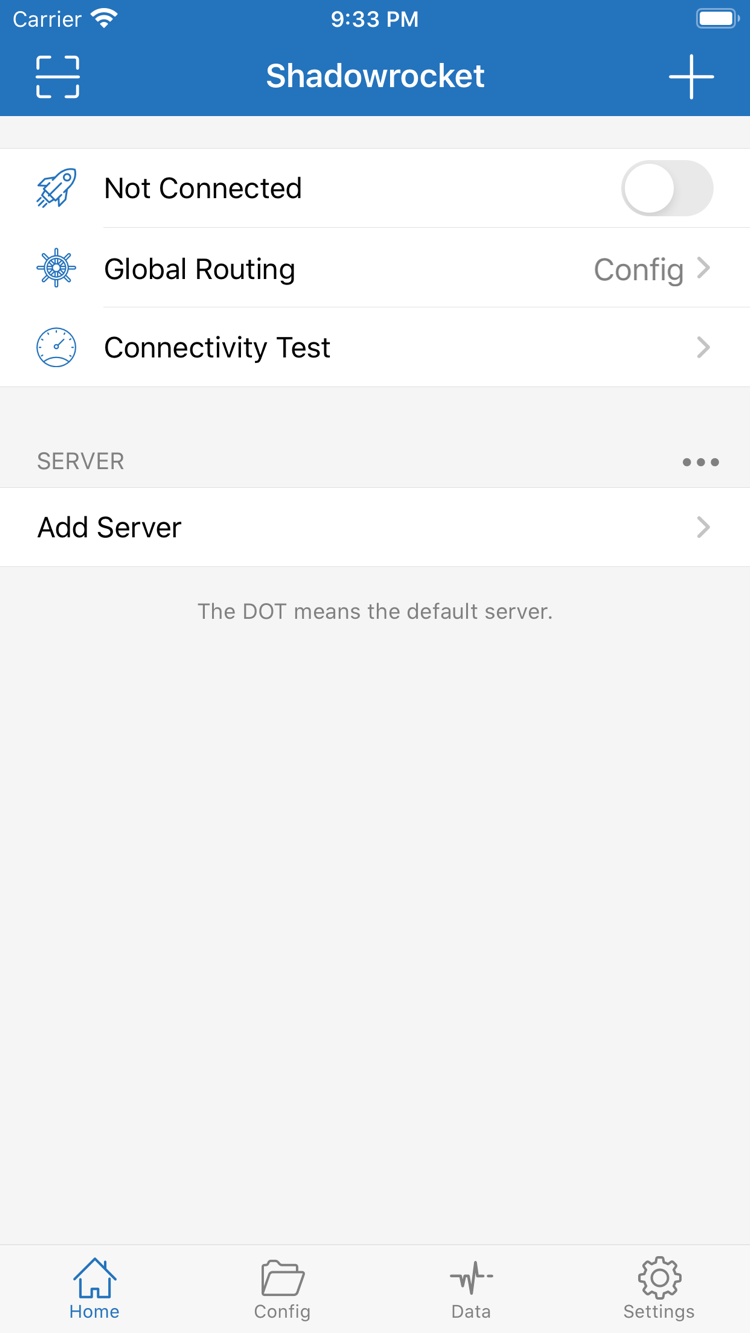
Official Shadowrocket Home screenshot showing the connection switch, Global Routing and Add Server
  • DeveloperShadow Launch Technology Limited
  • App ID932747118
  • One-time purchase
[General]

Connection settings and configuration index

Understand the difference between the connection control, routing mode and rule file before checking each one. The section index is organized by what to verify as you use the app.

Shadowrocket’s connection switch, server selection and configuration file each serve a different purpose. The switch starts or stops the connection; server details determine which existing service handles proxied requests; and Global Routing determines whether requests follow rules, use the proxy for everything or connect directly. Importing server details does not automatically select rules, and editing Rule does not mean the current routing mode will use that configuration. Keep these three layers separate when troubleshooting to avoid repeatedly changing server settings to fix a rule issue.

For your first setup, follow the quick-start guide to import your own existing details and verify that a connection works before adjusting routing rules and On Demand. Protocol type, transport settings and authentication fields must match your existing server information. The rules on this page explain syntax only; they contain no connection credentials and are not a complete configuration tailored to your needs. For unfamiliar interface terms, use the quick reference at the bottom of a topic card. For field syntax, see the configuration fields guide.

Global Routing: Choose how requests are handled

Check Global Routing on Home. Config applies the policies in the current configuration, Proxy sends requests through the proxy, and Direct connects without the proxy. To use rule-based routing, select Config first, then confirm which configuration file is active. Temporarily switching modes can help determine whether a problem is related to rules, but restore the original selection after testing. Changing the mode will not add server credentials or fix an unavailable service. Recording the results before and after a change makes it easier to isolate the cause than changing several settings at once.

[Rule]
DOMAIN-SUFFIX,example.com,PROXY
FINAL,DIRECT

See the configuration fields guide for a complete explanation of rule types, policies and configuration sections. Follow the quick-start guide for your first import and connection check.

[General]

Getting Shadowrocket on iPhone and iPad

The App Store is the only way to get Shadowrocket. Check device compatibility and the account used for the purchase, then follow the system prompts to install and connect for the first time.

iPhone

For your first setup, follow the Home, Add Server and Config sequence. Check the App Store listing for system requirements, and verify the developer and App ID before purchasing.

When you connect for the first time, the system may ask permission to add a VPN configuration. Confirm that the prompt was triggered by the Shadowrocket you are using, then follow the system instructions to authorize it. This system setup is required to establish a connection; it does not import server details. After authorizing, select your own valid server and check Global Routing. Even when the system shows a connection indicator, test a request to its destination rather than assuming that turning on the switch completes the setup.

See how to get Shadowrocket and open it for the first time on iPhone →

iPad

Use the Apple ID originally used for the purchase to check your purchased items. Purchase eligibility across iPhone and iPad, and system requirements, are as listed on the App Store page.

A wider display may change how lists and editing screens appear, but server details, routing mode and rule files still need to be checked separately. If you restore settings from another device, verify that the current server is available, Config has the expected file selected, and any required system permissions have been granted. Installing the app and migrating its configuration are separate steps. Restoring a purchase only recovers access to the app; check connection details and routing settings against their current state.

See iPad purchase and configuration notes →

Shadowrocket is also available on Mac and Apple TV from the same App Store. Check the listing for compatibility details.

After opening the App Store product page, check the currency and purchase status shown for your account’s storefront. If you have already purchased the app, check Purchased under the original account first rather than assuming you need to pay again based only on the price button in search results. Storefront availability, system requirements and whether the purchase is universal are as listed on the App Store page. This page does not provide fixed system requirements or assume that all accounts see the same storefront information.

[Host]

App Store verification and purchase details

Check the developer, official icon and App ID. Buying the app and having a service subscription are separate matters.

  • DeveloperShadow Launch Technology Limited
  • App ID932747118
  • Closed-source commercial app
  • One-time purchase

The developer name and App ID must both match

When you search for Shadowrocket on the App Store, listings with similar names may appear. Open the product page instead of relying on the search result title alone. The developer should be Shadow Launch Technology Limited, and the product URL should include App ID 932747118, shown as id932747118 at the end of the address. The app name helps identify the product; the developer and App ID confirm the specific listing. Check all three, then review device compatibility and the purchase button. If anything does not match, return to this site’s getting-the-app guide and verify the listing using the product page link.

The App ID identifies a product in the App Store; it is not a device number or your purchase order number. When sharing verification details, you can provide the product name, developer and App ID without showing account information or order details. The App Store link on this site always points to the same Shadowrocket listing. Prices, compatibility and purchase status are shown by the App Store based on the current storefront and account.

Check the official icon alongside the App Store listing
Official Shadowrocket app icon: a rocket outlined in blue and purple on white

The same official app icon appears in this site’s header and here. When verifying the listing, compare its icon and developer details; do not rely on the icon alone. It can help identify the app, but neither the name nor a similar-looking graphic replaces checking the App ID.

Shadowrocket is a closed-source commercial app, available and updated through the App Store. For features, compatible devices and system requirements, check the current product page and the options available in the app. For instructions on a setting, follow the steps in the official manual. App Store details and configuration examples serve different purposes: the former helps verify what you are buying, while the latter explains rules. Example domains and policies will not necessarily suit every use case.

One-time purchase and storefront pricing

Shadowrocket is a one-time purchase. The US storefront price is about US$2.99; other storefronts show local currency, and the App Store page lists the final price. Before purchasing, make sure you are signed in with the account you plan to use long term and check that your device meets the store’s compatibility requirements. The purchase is associated with that account. If you reinstall the app or switch devices, first look for it under Purchased on the original account rather than assuming that seeing it in search results means you need to buy it again.

iPhone and iPad can use the same purchase within the eligibility shown on the App Store listing; check the listing to see whether the purchase is universal. Restoring a purchase and restoring a configuration file are separate steps: the first confirms your eligibility to get the app, while the second restores server details, rules and other settings. Even if the app is available to download again on a new device, open it to check the configuration, grant any required system permissions and test the connection.

Buying the app ≠ a service subscription

Buying the app ≠ a service subscription. Purchasing Shadowrocket gives you access to the client; it does not include a server, subscription URL or connection service. All import instructions here assume that you already have your own subscription or server details. This site does not provide, sell or recommend nodes or subscriptions. Check the validity, authentication details and status of your existing service with your own provider; they cannot be determined from the app purchase record.

Single-server details, subscriptions and configuration files are also distinct. Server details describe the protocol and authentication parameters for a connection. A subscription URL retrieves or updates a set of server details. A configuration file organizes global settings, rules and other processing options. Importing one does not necessarily include the other two. If the list is empty during setup, check what you imported. If a connection fails, check the selected server. If routing differs from what you expect, check Global Routing and Rule. Working through each layer is clearer than importing everything again.

Storefront availability, account region and purchase restoration

App Store search results and product page availability depend on your account’s storefront. If the expected listing does not appear in search, first check the fixed product page, then verify your signed-in account and storefront. Do not assume that the US product link used on this site means your account will show the same currency, purchase status or availability. Check the App Store for current purchase availability and the product page’s compatibility section for system requirements.

Before switching devices or reinstalling, confirm that the App Store is signed in with the original purchase account, then look for Shadowrocket in Purchased. If it is missing, first verify the account and purchase record so you do not confuse another account’s status with the original purchase. After recovering the app, check that your configuration backup is complete. Server details may change as your existing service changes, so verify that they are still current after restoring an old file. Restoring a purchase does not guarantee that old connection settings still work.

Updates, backups and troubleshooting notes

App updates are delivered through the App Store. Manage automatic updates in your system settings or check the update status in the store. This site does not list specific version numbers or update dates, which could be mistaken for current information later. Before changing rules, switching devices or restoring a configuration, keep a backup you can identify and note the active file and server. If you use iCloud sync, check the actual result on another device rather than relying only on the toggle being enabled.

Troubleshooting notes only need the steps that caused the issue, the selected Global Routing mode, relevant rules and redacted error details. Do not include passwords, private parameters in subscription URLs or complete authentication fields in public materials. Connectivity Test results help assess a connection, Data statistics show traffic, and Diagnostics logs provide additional clues. Review them alongside the actual request result to distinguish server reachability, rule matching and the destination service’s response.
Common questions

Why check Global Routing after importing?

Importing saves server details or configuration content; Global Routing determines how requests are handled. To use rules, select Config and confirm the correct configuration file is active. Proxy and Direct handle requests differently. Check the mode before deciding whether a rule is working. Learn about Global Routing →

Does a Connectivity Test result mean all requests are working?

A test result only provides information about that specific test; it does not replace checking an actual request to its destination. Also verify the selected server, routing mode, matching rule and destination service response. Compare results under the same conditions and avoid changing several settings at once. Learn about Connectivity Test →

Why check the selected server again after updating a subscription?

An update may change the server list, so the old entry may no longer match the currently valid details. After updating, check the list, current selection and protocol settings, then test the connection. Updating a subscription does not switch the rule file; check Config separately. Learn about Subscribe →

What should I check after restoring a purchase?

Check your existing server details, active Config file, Global Routing selection and system connection permissions. Restoring a purchase recovers access to the app; restoring a configuration recovers its settings. Confirm both separately, then test an actual request. Learn about Config →

Verify the App Store listing using three details →

[URL Rewrite]

Technical notes: restoring purchases and import formats

Find additional guidance by topic. Each note covers one operation and does not replace the full setup sequence for a first-time configuration.

Do you need to buy Shadowrocket again after getting a new phone? Redownload it from Purchased using your original account

Start with the original purchase account to understand how a one-time purchase is linked to your account and how to find the app in Purchased on the App Store. After switching devices, recover the app first, then check your existing servers and rules. Restoring a purchase is not the same as migrating a configuration. The article also covers what to verify if your account region differs.

Read the purchase restoration guide →

Seeing multiple Shadowrocket listings in the App Store? Verify the developer, icon and App ID

Open the product page from the search results and check Shadow Launch Technology Limited, the official icon and App ID 932747118 in turn. This article explains where to find each detail and why the name or icon alone is not enough to verify the product. Before purchasing or downloading again, complete the checks, then review the price and device compatibility shown in the store.

Read the App Store verification guide →

Shadowrocket server link formats explained: how ss://, vmess://, vless:// and trojan:// links differ from subscription URLs

Learn which protocols and fields are carried in common sharing links, and how single-server details differ from subscription URLs that update a server list. Import existing details using the appropriate option; do not assume similar-looking URLs are interchangeable. This article explains formats to help you check copying, identification and import steps. It does not provide connection credentials or subscription services.

Read the link format guide →

If you need to set up a connection from scratch, start with the quick-start guide. If you can connect but the routing differs from what you expect, check the configuration fields guide. For a single unfamiliar term, use the glossary. Choosing a page based on the issue helps preserve a working configuration and avoids changing protocols, rules and automatic connection conditions all at once.

View all articles →